Segregation of Duties for Small Business: A Practical Guide
Most internal control advice assumes you have a payables clerk, a cashier, a controller and an internal audit team. A business with three people in the office has none of that, and guidance on segregation of duties for a small business often ends with "do what you can." This guide is more specific. It shows which duties must never sit with one person, what to do when you genuinely cannot split them, and how to use the settings already inside QuickBooks Online to close the gaps.
What segregation of duties actually means
Segregation of duties is the idea that no single person should be able to start a transaction, carry it out, record it and then check it. If one person can do all four, they can make a mistake or commit a fraud and also hide it, and nobody will notice until the money is gone.
Accountants usually split financial work into four types of duty:
| Duty | What it covers | Examples | |---|---|---| | Authorisation | Approving that something should happen | Approving a supplier invoice, signing off a pay rise, approving a refund | | Custody | Physical or electronic control of the asset | Holding the cash box, having online banking payment rights, holding cheque books | | Recording | Entering the transaction in the books | Posting bills, recording receipts, editing customers and suppliers | | Reconciliation and review | Checking that the records match reality | Bank reconciliations, reviewing the aged payables, reading the audit log |
The rule of thumb is simple. Any person can hold one of these duties, and in a small team they may hold two, but the person who records or has custody should never be the only person who reconciles. That pairing is where most small-business losses go undetected.
Why segregation of duties matters more in a small business
It is tempting to think fraud is a large-company problem. The evidence points the other way. The Association of Certified Fraud Examiners' Occupational Fraud 2024: A Report to the Nations studied 1,921 cases across 138 countries, with a median loss of $145,000 per case and a median of 12 months before the fraud was caught. A lack of internal controls was the primary weakness in 32% of cases, the single biggest factor the study identified.
Billing schemes, where a business pays fake or inflated invoices, appeared in 22% of cases, and cheque and payment tampering in 11%. Both are exactly the schemes that thrive when one person can set up a supplier, post a bill and release the payment. And 43% of frauds were uncovered by a tip, more than three times the next most common method, which tells you how often the books themselves failed to raise the alarm.
None of this means suspecting your staff. Good controls protect honest people too, because when something goes wrong the records show clearly who did what.
The incompatible pairs to break first
You do not need to separate everything. Start with the combinations that create the biggest exposure. In order of priority:
1. Paying suppliers and adding suppliers. If the same person can create a new vendor record (including the bank details) and release payments, they can pay a fictitious supplier. Split these, or make sure the owner approves every new vendor and every change to vendor bank details.
2. Receiving money and reconciling the bank. Whoever handles cash receipts or customer payments should not be the only person who reconciles the bank account. Otherwise receipts can be skimmed and the reconciliation quietly "balanced." If you need a refresher on doing it properly, see our guide on how to reconcile a bank account in QuickBooks Online.
3. Running payroll and approving payroll. The person who prepares payroll should not also approve it and release the payment. Ghost employees and unauthorised rate changes live in this gap.
4. Issuing credit notes and recording customer receipts. A credit note can be used to write off a customer balance that was actually paid in cash and pocketed.
5. Posting journal entries and closing the period. Manual journals can move almost anything. Someone other than the preparer should review them, and closed periods should be locked.
A worked example: three people, one office
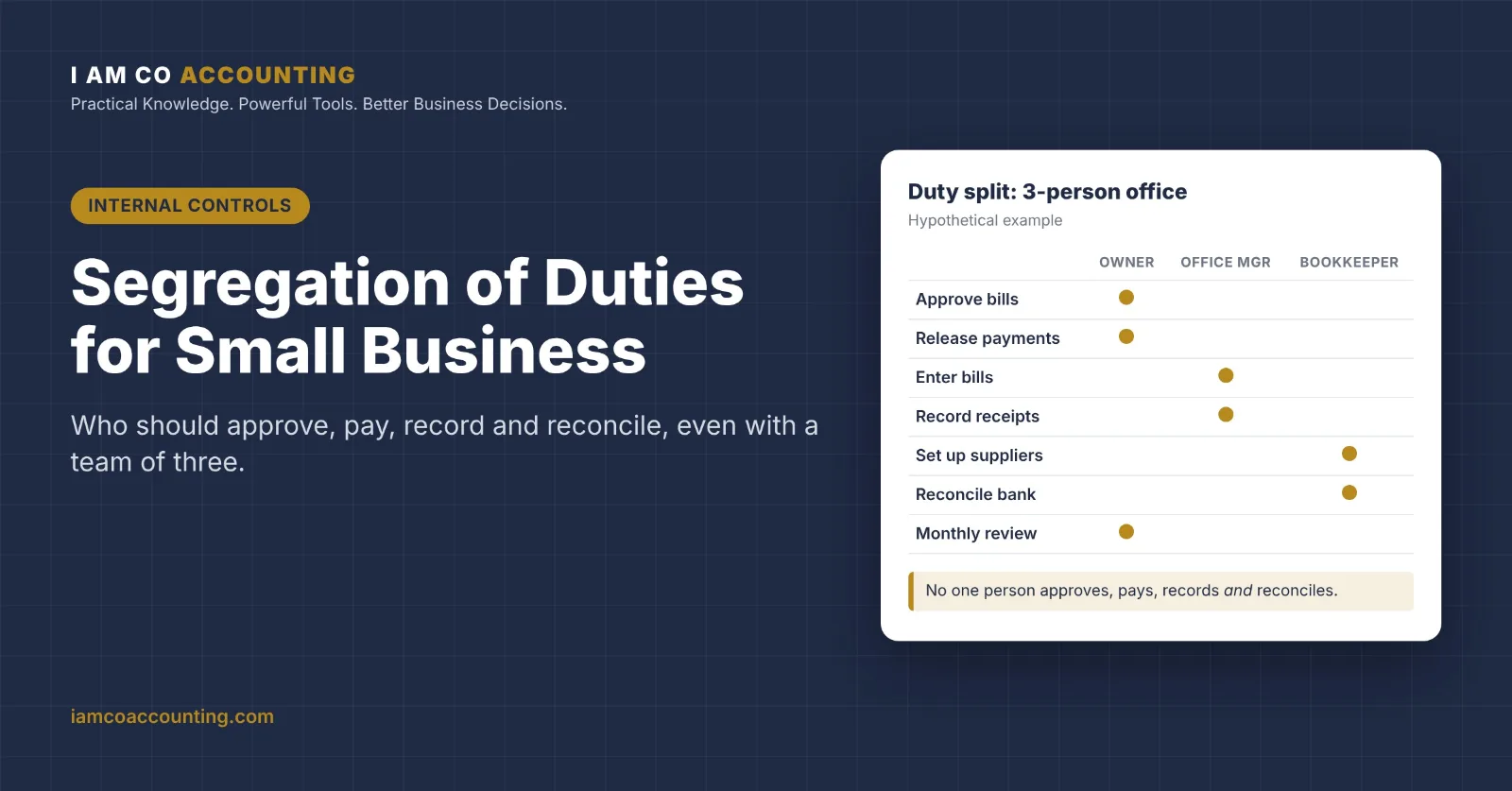
Here is a hypothetical business to make this concrete. Harbour Lane Interiors is a small design and furnishing company with an owner, an office manager and a part-time bookkeeper who works two days a week. Before any changes, the office manager does almost everything: takes customer payments, sets up suppliers, enters bills, pays them through online banking and reconciles the bank each month. The owner looks at the bank balance and the profit figure, and that is all.
Now imagine the office manager sets up a supplier called "HL Fit-Out Services" with their own bank details and enters a bill for $1,850 each month. Over nine months that is $16,650 (9 × $1,850), paid out, recorded as a cost of sales and reconciled every month without a single exception showing. Nothing in the books looks wrong, because the person who created the problem is the same person who checks for problems.
Here is how the duties could be redistributed with the same three people:
| Task | Before | After | |---|---|---| | Create or edit suppliers and their bank details | Office manager | Bookkeeper enters, owner approves changes | | Enter supplier bills | Office manager | Office manager | | Approve bills for payment | Nobody | Owner | | Release payments in online banking | Office manager | Owner (dual authorisation where the bank offers it) | | Record customer receipts | Office manager | Office manager | | Reconcile bank accounts | Office manager | Bookkeeper | | Review the reconciliation and audit log | Nobody | Owner, monthly | | Post journals and lock the period | Office manager | Bookkeeper posts, owner reviews |
With this setup, the fake supplier would need the bookkeeper to create it and the owner to approve it, and every payment would pass through the owner's hands in the bank. Even if one of those failed, the bookkeeper reconciling the bank would see a payee that the office manager cannot hide.
None of this needed a new hire. It needed the owner to take on about an hour a month of approval and review work.
When you cannot split the duties: compensating controls
Sometimes there truly is only one person doing the books, or the owner does everything. In that case you add compensating controls, which are checks that make a problem visible even when the duties overlap. The most effective ones for a small business are:
Bank statements go straight to the owner. Have statements delivered to the owner's own login or email, and have the owner open them before anyone else. Scanning a month's payees takes ten minutes and catches a surprising amount.
The owner reviews a short monthly pack. The bank reconciliation report, the aged payables and receivables, a list of new suppliers and any vendor detail changes, and a payroll summary. Initial and date it.
Mandatory leave and job rotation. If one person handles a key area, make sure someone else covers it for at least a week each year. Many schemes need constant attention to stay hidden.
Surprise checks. Occasionally count the cash box, or trace three random supplier payments back to an approved invoice and a real delivery.
An external review. A quarterly check by an outside accountant deters misconduct and catches posting errors too.
Using QuickBooks Online to enforce the split
If you use QuickBooks Online, several built-in features support these controls. Menu names below are for current QuickBooks Online versions; QuickBooks Desktop works differently, and available roles vary by plan and region.
Give each person their own login and the narrowest role that works. QuickBooks Online offers roles such as Standard limited (customers and vendors), Reports only and Track time only, and Advanced subscribers can build custom roles. Never share the admin login. Intuit lists what each role can do in its article on user roles and access rights in QuickBooks Online. Note that plans include a limited number of billable users (for example, one on Simple Start and three on Essentials in the US), so check your plan before you design the roles.
Read the audit log every month. The audit log records who added, changed or deleted transactions and settings, and when. Admins open it from Settings, then Audit log, and can filter for deleted or edited transactions in prior months, new vendors and changes to bank details. Intuit explains the filters in Use the audit log in QuickBooks Online.
Lock closed periods. Go to Settings, then Account and settings, then Advanced, and edit the Accounting section to turn on Close the books. Set the closing date and a password for editing closed transactions, and let the owner or the external accountant hold that password. The Exceptions to Closing Date report then shows any change made after the books were closed. Intuit covers this in Edit your closed books.
Keep bank payment rights outside the bookkeeping system. QuickBooks records the payment; your bank releases it. Set up your online banking so the person entering bills cannot also approve the transfer, or use the bank's dual-authorisation feature if it offers one.
A 30-minute monthly owner review
If you only adopt one habit from this guide, make it this. Once a month, after the books are closed (our month-end close checklist covers that part), sit down with:
- The bank statement and the bank reconciliation for each account, checking that the reconciled balance agrees to the statement.
- A list of all payments over a threshold you choose, checking that each payee is familiar.
- New suppliers and any changes to supplier bank details.
- The payroll summary, checking names and totals against what you expect.
- The audit log, filtered for deletions and edits to closed months.
- Aged receivables, asking about any customer balance written off or credited.
Sign and date the pack. That signature is evidence that the control exists, which matters if you ever need to show a lender, a funder or an auditor how your finances are managed.
How I AM CO ACCOUNTING can help
If you would like a second pair of eyes on your controls, book a free Financial Systems Health Check. We will look at who does what in your finance process, where the gaps are, and how your QuickBooks Online or QuickBooks Desktop file is set up. We also handle QuickBooks setups and clean-ups, backlog reconciliations and monthly bookkeeping, which can itself provide the independent reconciliation a small team is missing.
If you prefer to build the knowledge yourself, The Practical Accountant ($19.99) walks through the bookkeeping cycle, bank reconciliations and month-end checks in plain English, and more templates are available in the I AM CO ACCOUNTING store.
Frequently asked questions
What is segregation of duties in simple terms? It means splitting financial tasks so that no one person can approve, handle, record and check the same transaction. Each person's work acts as a check on someone else's.
How do you segregate duties with only one or two employees? Split the most dangerous pairs first, such as adding suppliers and paying them, and have the owner take over approval and review. Where duties cannot be split, add compensating controls: the owner receives bank statements directly, reviews a monthly pack, and arranges an occasional outside review.
What are the four types of duties that should be separated? Authorisation, custody of assets, recording transactions, and reconciliation or review. The most important rule is that the person who records or holds the asset should not be the only person who reconciles it.
Does QuickBooks Online help with segregation of duties? Yes, within limits. User roles restrict what each person can do, the audit log shows who changed what, and the closing date with a password protects closed periods. It cannot control your bank's payment approvals, so those need to be set up with your bank.
Is segregation of duties a legal requirement for small businesses? For most private small businesses it is good practice rather than a specific legal rule, although lenders, grant funders and auditors often expect to see it. Public companies and some regulated organisations face formal requirements.
This article provides general information on internal controls and is not legal, audit or professional advice for your specific circumstances. QuickBooks features and menu paths are described as they appear in the US version of QuickBooks Online in November 2026 and may differ by plan and region.
Need help applying this to your business?
Our accountants and QuickBooks ProAdvisors work with businesses and NGOs in Sierra Leone and worldwide.
Request a free consultationKeep reading
Profit vs Cash Flow: Why Profit Isn't Money in the Bank
Why a profitable business can still run out of cash, explained with a worked example, plus six practical ways small business owners can protect cash flow.
QuickBooksHow to Reconcile a Bank Account in QuickBooks Online
Step-by-step guide to reconciling a bank account in QuickBooks Online, with a worked example and fixes for when the difference will not reach zero.